Thursday, March 29, 2007

PDFs of Cochrane Reviews


Evidence-Based Medicine Reviews in PDFsPDFs for EBM Topic Reviews in The Cochrane Database of Systematic Reviews are now available. Affinity staff can click on clearly marked links on a Topic Review page and a Group Table of Contents page in the database, as well as in a Search Results page, to get to the PDFs.

To access The Cochrane Database through Affinity, follow this path :

Method 1 :
Affinity Intranet > Library > Find the Best Evidence > Cochrane

Method 2:
In the search box atop of any Affinity Intranet Webpage, type “Cochrane.”
The first two items in the results list will lead to The Cochrane Database.

Find the Best Evidence : Evidence-Based Practice Tools - (100%)Successfully navigate the many tools available for Evidence-Based Practice. Includes an easy-to-use framework for accessing Cochrane Systematic Reviews, practice guidelines, clinical trials, and more ...
Evidenced-Based Practice Resources (Ovid) - (100%)Access to our Evidence-Based Practice Reviews via Ovid. Includes The Cochrane Library (complete) and ACP Journal Club.

Thursday, March 15, 2007

Article on LEAN as applied to Healthcare

Reducing waste in US health care systems. Bush RW.
JAMA. 2007 Feb 28;297(8):871-4. Virginia Mason Medical Center, Seattle, Wash 98101, USA. PMID: 17327529 [PubMed - indexed for MEDLINE]

Link to Full-text (This should work at any Affinity computer or through remote access.)

Wednesday, March 07, 2007

Drop-in Computer Labs Available to “Roving” Affinity Employees

Traveling throughout Affinity for meetings? Away from your office?
The Training & Development computer lab is booked with a class?
Got some spare time between meetings?
Need a computer to get some work done in the meantime?

Need a quiet place to do the online JCAHO Mandatories?
Just want to check your email?

Stop in at the computer labs at the MMC and STE Health Science Libraries.
No appointments necessary.

Access to Microsoft Office, Internet, Outlook email, and more …

Thursday, February 15, 2007

2007 JCAHO Manual on Affinity Intranet

The 2007 version of the JCAHO Manual is now available on the Affinity Intranet.

There are several ways to find the No Login/No Password version :

Method 1 :
Follow this direct link :
2007 JCAHO Manual


Method 2 :
On the Affinity Intranet,
Use the search Box at the Top of the page
Type in JCAHO or CAMH
The 2007 version should appear near the top of the results list.

Method 3 :
Affinity Intranet > Library > Find Books > Electronic Bookshelf
Type in JCAHO
The 2007 version should appear 1st in the results list.

Method 4 :
Affinity Intranet > Library > General Reference Links > JCAHO Resources > JCAHO Manual

Whatever happened to SAM? Or What’s in a Name?

Are you wondering whatever happened to Scientific American Medicine (SAM)?

In the old days, the Libraries subscribed in print format. Then it moved to online-only access.
A few years ago, SAM changed its name to WebMD Scientific American Medicine. Soon after that, it changed its name again to ACP Medicine Online.

The Evolution : SAM > WebMD SAM > ACP Medicine Online

Through it all, Affinity Library Services has maintained access in one way or another to this valuable resource for high quality, peer-reviewed, current, evidence-based medical information and CMEs.

We currently have access to ACP Medicine Online with IP Authentication.
That means, NO username or password—just make sure you are at an Affinity computer (or using Remote Access) to get there.

Try it now : ACP Medicine Online


Want to find it again later?
Just type “acp” into the search box atop any Affinity Intranet Page. It should appear at the top of the results list.

Wednesday, February 07, 2007

Antique Wheelchair is Archival Acquisition


This antique wheelchair is over 100 years old. It belonged to Ms. Bertha (Wilhorn) Keip.

It was recently donated to the MMC Library Archives by her grand-daughter, Sue McIlraith. Sue is a Dietition who works for Affinity.

The wheelchair is currently on display in the Archival Reading Room at the MMC Library.

Thursday, February 01, 2007

A Message from Affinity Library Services & The Print Shop

If you are in need of multiple copies or print jobs (more than 50 pages), please use the Affinity Print Shop.

Color MFDs are located in both the MMC and STE Health Science Libraries. They’ve become very popular places – and we are happy to see so many people using them. However, these machines are NOT designed for high volume duplication (no matter what Lanier says).

You’ll agree if you’ve ever :
Smelled an MFD overheat
Cleared multiple paper jams because the MFD is too hot
Gotten streaked pages (again) because it’s too hot
Had to explain to the 4 other people looking for their pages that they have to wait for that BIG job to finish
Waited for the MFD to reset color / toners, etc.
Filled a paper tray 3x in one hour (That’s 3 reams of paper, friends!)

By contrast, The Affinity Print Shop has the appropriate equipment, paper, and supplies for large print and copy jobs. It is also more cost effective for The Print Shop to fill these requests. In the interest of good stewardship, large print jobs should be sent to The Print Shop.

Time is of the essence!
The Affinity Print Shop has a fast turn-around time. You can email files to Print Shop Staff in the morning and potentially have your job delivered by the afternoon. You don’t have to send a paper copy of your original and wait for days for a reply. Mary Tyler and Heather Stenson offer fast and friendly service.

Thursday, January 18, 2007

EBM Reviews Filter in Ovid Medline

Did you know … You can quickly and easily filter results from any of our Ovid Evidenced-Based Medicine (EBM) databases just by clicking on the “EBM Reviews” limit from the main search page in Ovid Medline.

Click here to see a screenshot.

Contact your Librarian, Michele Matucheski, with questions on how to use Medline or the EBM Resources. We’re here to help!

Thursday, January 04, 2007

Old AudioDigest Tapes - Free to a Good Home

The MMC and STE Libraries have 1 year's worth of old AudioDigest tapes available for FREE. Although these tapes are too old to apply for CE credits, they do still offer a lot of good information for Physicians, PAs, Nurses, and other health professionals.

Subject areas include the following :
Urology, Psychiatry, Pediatrics, Otolaryngology, Orthopedics, Ophthalmology, Obstetrics & Gynecology, Internal Medicine, General Surgery, Gastroenterology, Family Practice, Emergency Medicine, Anesthesiology.

Look for them on the book sale tables at each library this month.

Why are we giving them away?
--limited shelving space for audiovisuals
--CE credits are available only for 3 years since date of publication
--Our libraries emphasize the most up-to-date info, so we want to make room for more recent issues.
-- Newer editions are available on AudioCD and MP3 files that can be downloaded to your computer or MP3 player. Contact Michele Matucheski for more details on accessing recent AudioDigest MP3 files.

Thursday, December 14, 2006

Need a Test Proctor? Ask a Librarian ...

Did you know that Affinity Librarians can proctor tests for distance education courses? With so many staff people taking advanced courses via distance education, this is a valuable and little-known service that we provide.

Affinity Library Services also provides quiet study areas, and a multitude of print and online resources to assist in your studies. We’re here to help!

Contact one of our Librarians if you are in need someone to proctor a test.

Michele Matucheski, MLS, AHIP
223-0340 MMC Library

Mary Bayorgeon, MLS, AHIP
738-2325 STE Library

Wednesday, November 22, 2006

18 New Titles on Affinity's Electronic Bookshelf!

I just updated the the Affinity Library Services Electronic Bookshelf with the following new eBooks :

New eBooks in Stat!Ref:
AJCC Cancer Staging Handbook
Handbook of Fluid, Electrolyte, and Acid-Base Imabalances
Maternal-Newborn Nursing & Women's Health Care - 7th ed.
Nursing Diagnosis Reference Manual - 6th ed.
Nursing Assistant Illustrated

New eBooks in Books@Ovid:
Avery's Neonatology
Clinical Practice of Neurological and Neurosurgical Nursing
Colon and Rectal Surgery
DeGowin's Diagnostic Examination
Electroencephalography
General Thoracic Surgery
Hemostasis and Thrombosis
Hospital Epidemiology & Infection Control
Joslin's Diabetes Mellitus
Physical Medicine and Rehabilitation
Principles and Practice of Gynecologic Oncology
Principles and Practice of Radiation Oncology
Principles of Ambulatory Medicine
Williams Obstetrics

All these titles should be available to Affinity staff and affiliates via any Affinity desktop computer or through remote access.
Use the link above, or visit the Library Services website on the Affinity Intranet :
Library > Find Books > Electronic Bookshelf

We now have well over 350 titles in our eBook collection!

Friday, November 17, 2006

Google Search Engine Customized for Consumer Health & Patient Education

The Consumer Health and Patient Education Search Engine was developed by Medical Librarian David Rothman.
Search the web for freely accessible, quality controlled consumer health information.

Includes MedlinePlus and other sites recommended by The national Library of Medicine and CAPHIS (Consumer and Patient Health Information Section of The Medical Library Association). The Good Stuff!

Tuesday, November 07, 2006

35 Years of MEDLINE

Happy 35th Birthday, MEDLINE!

NLM's flagship database debuted on October 27, 1971.

Read the October 23, 2006 NLM News and Events Announcement.

Monday, October 30, 2006

Winners of the 2006 National Medical Librarians Month Celebration

Thank you to everyone who participated.
We had over 200 online entries in our Guess How Many Kisses Drawing!
We welcome the wide participation!


STE Resource Café Winners
Candy Kisses - Jackie Mitchler of Info Systems
(She guessed 220…the actual amount in the RC Candy Jar was 203).

$10.00 Starbucks Gift Certificate (for the word search) - Jenny Westenberger, Resource Café "Barista"

$5.00 Starbucks Gift Certificates (Door Prize):
Cindy Remus - Medical Imaging
Laura Becker - NHP
Cynthia Wolf - Info Systems
Donna Gmur - Peds/Gyn STE

STE Professional Library Winners
Candy Kisses : Chuck Bichel, Library Patron

$10 Starbucks Gift Certificate (for the Word Search) : Donna Larson, Health Information

$5.00 Starbucks Gift Certificates (Door Prizes) :
Dr. Podlusky, Pathology
Maron Hauschel, Environmental Services
Debbie Beatty, Pain Clinic
Lisa Gorges, Radiation Oncology, Mercy

MMC Library
Candy Kisses – Cindy Jungwirth, Center for Women & Families
(She guessed 132…the actual amount in the Candy Jar was 131).

$10.00 Starbucks Gift Certificate (for the word search) – Mary Morelli, Vascular Lab

$5.00 Starbucks Gift Certificates (Door Prizes) :
Jane Martinez - Quality
Sean Bebiro – Radiology
Tracy Miller – Nuclear Medicine
Terrie Reitzner – Physical Rehabilitation

Affinity Health & Wellness Resource Center – Oshkosh YMCA
Candy Kisses - Sarah Fredrickson, Internal Medicine, AMG, Neenah.
She guessed 91 … the actual amount in the jar was 94 kisses.

$10.00 YMC Gift Certificate (for the Word Search) - Jennifer Schreiter - Rehab Services in Calumet Medical Center.

YMCA $5.00 YMCA gift certificates (Door Prizes) :
Melissa Borgen
Kris Bonlander (Pediatrics, St. E)
Liesl Storm – Physical Therapist at YMCA
Michelle Jerabek - Oshkosh Y member and part-time instructor.

Thursday, October 26, 2006

Did you know … You can access the Affinity Library Collections right from your desktop?

The Electronic Bookshelf – Over 300 eBooks with full-text!

MMC Library Catalog (includes the 20th Ave YMCA in Oshkosh)
STE Library Catalog (includes STE Resource Café)

New Books at Affinity Libraries – Browse a few of our new selections. These featured items are also available for checkout.

Put in a request for a book, video, or audio, and we’ll send it to you, wherever you are within Affinity.

Visit the Affinity Library Services Website for more than you ever dreamed would be available online …

Contact us with questions :
MMC Library 3-0342 or mmclibrary@affinityhealth.org
STE Library 8-2324 or sehlibrary@affinityhealth.org
STE Resource Café 8-2857

Wednesday, October 18, 2006

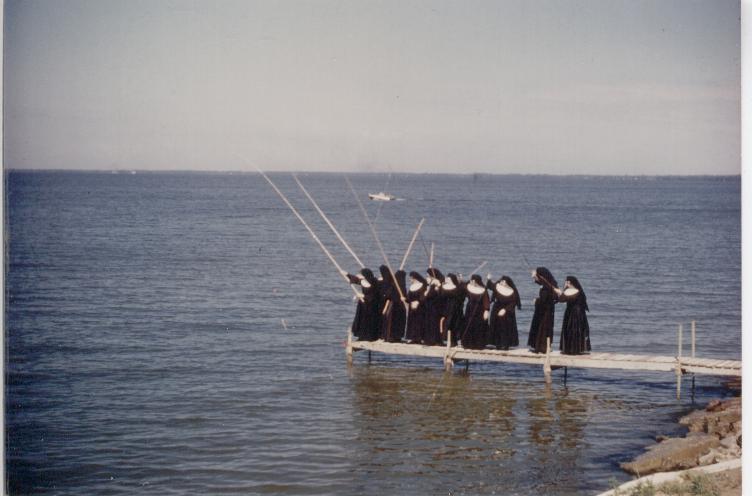
Nuns on a Fishing Expedition : Affinity at Play - Archives Week 2006

This delightful picture is from Sister Anne Dresang’s personal collection of photos, now held in the STE Library Archival Collection. To see more in this series, click here.

If you were wondering what was contained in the latest Cornerstone time capsule recently “buried” at St. Elizabeth Hospital, check this list. You may be surprised by what it contains!

The MMC Library is seeking help in identifying unnamed employees in several of our photo albums. Stop in to reminisce, and help us give these people names! We’ll supply the post-it notes!

The Affinity Library Archives hold many more treasures. Visit today!

Wednesday, October 11, 2006

Improve Patient Education with Info Rx Pads


Medical Staff and Clinicians are encouraged to request Info Rx Prescription Pads from Affinity Library Services.

mmclibrary@affinityhealth.org 223-0340
OR
sehlibrary@affinityhealth.org 738-2857 or 738-2324

The simple act of writing down a diagnosis, a medication, or procedure can help patients get the info they need to make better health care decisions. Info Rx Pads make it easy!

Research has shown that patients recall only a fraction of what was discussed during an appointment with their health care provider. Library Staff often spend extra time with patients and family members who don't know what their actual diagnosis is, much less how to spell it. The Info Rx program seeks to save the valuable time of all involved.

Benefits of the Information Rx program :
* Helps improve patient communication
* Encourages compliance
* Reduces the number of poor quality internet searches patients sometimes do on their own
* Saves valuable TIME! (for medical staff, patient, and library staff)
* Empowers patients
* Enhances the quality and outcome of the interaction during an office visit and after the patient returns home.

For patients without ready access to the internet, Affinity's Professional Librarians can provide internet access and any needed instruction for finding health information. We have both the tools and the expertise to refer patients to accurate and trustworthy health information.

Team up with us!

Thursday, October 05, 2006

Team Up! for Your Health


Did you know …
Our Libraries are open to the public and free of charge.
You’ll find an environment that is confidential, private,
and supportive of your health care information needs.

Visit us to find books and videos about health issues
for yourself or a family member.
You can check out the materials to take home
and share with your family and friends.

You can also use our computers to find health information online.

Resources you will find in our libraries include :
* Books
* DVDs
* VHS
* Audiocassettes
* CDs
* Magazines
* Newsletters
* Internet

If you can’t find what you’re looking for, just ask any of our friendly librarians for help.

Clark Family Health Science Library Health Information Center
Mercy Medical Center
500 S. Oakwood Rd.
Oshkosh, WI
920-223-0342
M-F 8 am -4:30 pm
Librarian : Michele Matucheski

Affinity Sports Medicine & Wellness Center
20th Ave. YMCA
3303 W. 20th Ave.
Oshkosh, WI
(920) 223-2479
Hours vary, so please call ahead.
Librarian : Ann Paulson

St. Elizabeth Hospital Resource Café
St. Elizabeth Hospital
1506 S. Oneida St.
Appleton, WI
(920) 738-2857
M-F 8 am – 4:30 pm
Librarian : Margo Lambert

Or visit us online :
www.affinityhealth.org and click on Health Resources.

Monday, October 02, 2006

October is National Medical Librarians' Month


Need health care information?
We've got everything under the sun!

Word Search Challenge for NMLM!


Complete this Word Search (Word doc) for a chance to win a Gift Certificate to the STE Resource Café or MMC Starbucks Coffee Cart. Good Luck!

October is National Medical Librarians' Month : Enter Our Drawing

How many Chocolate Kisses in the jar?
Enter your guess online by visiting the library website, or use this web form.

Or stop by the libraries at :

· Mercy Medical Center Library
· St. Elizabeth Hospital Professional Library
· St. Elizabeth Hospital Resource Café
· Affinity Health & Wellness Center at the
20th Ave Oshkosh YMCA.

Treats while they last!

Contest ends October 31.

The winning entry wins all the KISSES!


As always, it is our pleasure to serve you.

Thursday, September 21, 2006

Flu - Patient Ed. Materials from CDC

The Centers for Disease Control & Prevention (CDC) has posted an array of downloadable patient and provider education materials to its influenza web section.

Visit the CDC's 2006-07 Flu Gallery for :
* Patient education materials for the 2006-07 flu season
* Provider education materials for the 2006-07 flu season
* Patient screening form for trivalent inactivated influenza vaccine (TIV)
* Stop the Spread of Germs posters and flyers in several languages
* Fact sheets in several languages
* Influenza vaccine VISs.

Thursday, September 07, 2006

Keyword Searching Skills Tutorial

Are you wondering why your last search brought up some less than stellar results? Or no results at all?

It could be that you were looking "in all the wrong places."
Or it could be your choice of keywords …

Selecting the proper keywords to pull up exactly what you seek is both an art and a skill.

Brush up on your keyword searching skills with this excellent online tutorial from McMaster University Library.
It covers the following :
· Choosing Keywords
· Phrase Searching
· Combining Words with And/Or/Not
· Nesting
· WildCards

It could mean the difference between getting a zillion hits on “poetry” and actually finding Robert Frost’s “The Road Not Taken.” In any case, you'll be a better searcher!

Wednesday, August 30, 2006

New 4-week Loan Period for Consumer Health Books

We’ve changed our policies on check-out loan periods : Consumer health and patient education materials (The Red-Dot books) are now routinely checked out for 4 weeks, instead of 2 weeks as in the past.

Although we’ve always been flexible with loan periods, this automatic 4 weeks allows our patrons more time to finish a book, and get it back to us on time without incurring an overdue notice.

The 4-week loan period is also comparable to Public Library check-outs. This is what our public patrons expect, so we feel good about anticipating their needs in this respect.

Please Note : Professional clinical and nursing books, BLS books, and other library materials still retain a loan period of 2 weeks.

Consumer Health and Patient Education collections are available at the following locations :

MMC Library (Oshkosh)
STE Resource Café (Appleton)
Affinity Health & Wellness Resource Center, 20th Ave YMCA (Oshkosh)

Can’t make it to a physical library? Search our catalogs from your desktop :
MMC Catalog STE Catalog

We’ll send requested items to YOU, wherever you are in Affinity. Just ASK!

Tuesday, August 15, 2006

What is The Cochrane Library?

The Cochrane Library is a mainstay of Evidence-based Practice. It is used to support health care decisions. It is produced by The Cochrane Collaboration, a group of clinicians, consumers, and researchers around the world.

Affinity has online access via Ovid from1996-to current. It is updated quarterly.
How to get there :
Affinity Intranet > Library > Find the Best Evidence > Cochrane
OR in the search box atop any Affinity Intranet page, type in “Cochrane”

Note: Limited number of simultaneous users - please logoff/exit when you're done.

There are 3 main parts to the Cochrane Library :
1) The Cochrane Database of Systematic Reviews (CDSR)
2) Database of Abstracts of Reviews of Effectiveness (DARE)
3) Cochrane Central Register of Controlled Trials Register (CENTRAL)

The Cochrane Database of Systematic Reviews (CDSR)
Also known as “Cochrane Reviews”
Growing collection of regularly updated summaries of the best available evidence prepared by members of The Cochrane Collaboration.
'Gold Standard' for high-quality systematic reviews
Full-text included in Cochrane Library. Includes :
1) Completed Reviews
2) Protocols (reviews that are still in preparation).
Cochrane Systematic Review abstracts are in PubMed but there is no link to full-text of the review.

The Database of Abstracts of Reviews of Effectiveness (DARE)
Other high quality published reviews prepared by people outside The Cochrane Collaboration.
Prepared by the National Health Service Centre for Reviews and Dissemination, University of York, England.
Complements the CDSR by offering a selection of quality assessed reviews in those subjects where there is currently no Cochrane review.
Brief critical appraisals of previously published reviews of the effects of health care.
Topics include therapy, prevention, diagnosis, rehabilitation and screening.
Structured abstracts, not full-text
DARE not indexed in PubMed, but original research articles may be
also available at no charge on the web from University of York
144.32.150.197/scripts/WEBC.EXE/NHSCRD/start

The Cochrane Central Register of Controlled Trials (CENTRAL)
Best source for tracking down the original studies.
Largest single source of controlled trials as part of an international effort to hand search the world's journals.
Includes reports published in conference proceedings and in many other sources not in MEDLINE or other citation databases.

Anatomy of a Cochrane Systematic Review
Cochrane Reviews are highly structured and systematic, with evidence included or excluded on the basis of clearly explained quality criteria.

Every Cochrane Review contains the following parts (See sample abstract) :

Abstract
Synopsis
Background
Objectives
Criteria for Considering Studies for this Review
Search Strategy for Identification of Studies
Methods of the Review
Description of Studies
Methodological Quality
Results
Discussion
Reviewers’ Conclusions
Potential Conflict of Interest

For a quick overview of the review’s findings, the following sections summarize the evidence :
Abstract - summarizes the objectives, methods, results and conclusions
Synopsis - a 100-word plain-language summary found directly beneath the abstract.
Reviewer’s Conclusions - an overview of the most important findings and discusses the implications for practice and research.

A Note before Printing the Complete Review : The full review may be 80 or more pages long and contain info not normally considered useful in a regular journal article. The reviewers include as much information as possible about the evidence they examined, and exactly how and why they arrived at their conclusions. They try to make everything as transparent as possible so that others can do their own evaluation of the evidence, if desired.

Unless you love slogging through metadata, the structured abstract will probably provide what a busy clinician needs to know about the evidence.

For more info :
Ovid Field Guide for The Cochrane Library
NICS Guide to The Cochrane Library

Questions? Contact your Librarian, Michele Matucheski at 223-0340.

Thursday, August 03, 2006

Citation Style Guides

Are you updating Policies and Procedures?
Wondering what to do with the bibliography of references?

Long Island University provides a handy color-coded AMA Citation Style Guide at http://www.liu.edu/cwis/cwp/library/workshop/citama.htm

It’s easy to use, and easy to parse because of the color coding. It offers clear formatted examples for citing the following :

* Book
* Journal Article (with or without volume numbers)
* Book Article or Chapter
* Website
* Journal Article on the Internet.

If you don’t like that presentation, try The AMA Style Guide from The University of Washington at http://healthlinks.washington.edu/hsl/styleguides/ama.html .

Not impressed with the AMA Citation Style? Try other formats at

Citation Style for Research Papers – Long Island University
http://www.liu.edu/cwis/cwp/library/workshop/citation.htm

More questions on citation style? We’re here to help!
Contact Library Services at
MMC 3-0342
STE 8-2324

Wednesday, July 26, 2006

New Version of the PubMed Tutorial and Training Page

PubMed is the free version of Medline (plus a whole lot more) available to anyone with internet access. http://www.pubmed.gov/

The National Library of Medicine has released a new version of the PubMed Tutorial which is available from the PubMed sidebar. Here's your chance to learn to use PubMed like an expert!http://www.nlm.nih.gov/bsd/pubmed_tutorial/m1001.html

Links to tutorial and quick tours http://www.nlm.nih.gov/bsd/disted/pubmed.html

Tip : Use the PubMed link on the Affinity Libraries webpage, and you'll get the added benefit of Affinity Library holdings (print with some online) appearing as part of your PubMed results set.

Feel free to ask Library Staff your PubMed questions, too. We're here to help!
MMC Library 3-0340
STE Library 8-2324

Wednesday, July 19, 2006

Looking for Online Books? Try The Electronic Bookshelf

The Library’s Electronic Bookshelf tracks over 300 eBooks in medicine, nursing, and related fields.

How to get there :
Affinity Intranet > Library > Find Books & AV > Electronic Bookshelf

Or in the Search Box at the top of all Affinity Intranet pages, type ANY of the following keywords : ebooks, bookshelf, online books.

Our collection of eBooks hail from a variety of sources including the following : Books@Ovid, StatRef, MDConsult, The NCBI Bookshelf, National Academies Press, and other sources.

The Electronic Bookshelf brings them all together in a single index, or catalog, so there’s no guessing which source contains the eBook you want. In most cases, the eBookshelf provides a direct link to the table of contents for the referenced eBook. All eBooks should be accessible on your desktop from any Affinity computer.

The Electronic Bookshelf is searchable by keyword, or browsable by subject and title.

Please note, the keyword search does NOT search the fulltext of each online book. We’re still working on including these in the Central Search federated search engine. Stay tuned …

Wednesday, July 05, 2006

Ready.gov

From the Us Department of Homeland Security, Ready.gov (www.ready.gov) provides abundant disaster preparedness information aimed at educating Americans on an ongoing basis about how to prepare for national emergencies, including natural disasters, biological or chemical accidents, and terrorist attacks.

Its home page is simply arranged, consisting of three links : Ready Business, Ready America, ad Ready Kids. Health care institutions will find that the information and suggested guidelines can be easily adapted for their needs. -- MLA News, July/August 2006.

MedPage Today : Worth a Look

Co-developed by the University of Pennsylvania School of Medicine's Office of Continuing Medical Education and MedPage Today, an independent information services company, MedPage Today (www.medpagetoday.com) offers daily coverage of breaking medical news, accompanied by professional medical analysis.

It's aim is to "provide clinicians with the real-time information they need to address their patients' questions" and to help them understand "how new developments might impact their clinical practice."

The website features news by specialty and gives visitors the option of signing up for daily morning email updates. -- from MLA News, June/July 2006.

Friday, June 30, 2006

New Surgeon General's Report Focuses on the Effects of Secondhand Smoke

U.S. Surgeon General Richard H. Carmona recently issued a comprehensive scientific report which concludes that there is no risk-free level of exposure to secondhand smoke.

For more information and a copy of the report (downloadable as a PDF or request a print copy) use this link: http://www.surgeongeneral.gov/library/secondhandsmoke/

Contact Affinity Library Services for information on smoking cessation.
MMC Library 3-0342
STE Library 8-2324
STE Resource Café 8-2857

Thursday, June 22, 2006

Wildlife at Mercy


Nature helps many people heal and re-energize.

Patients, families, and staff members have been enjoying the family of Red Fox that live near the pond at Mercy Medical Center in Oshkosh. The arrival of the Fox Family, however, seems to have driven off some of the birds we’ve grown familiar with in other years.

* If you miss the Great Blue Heron and the White Egret that used to visit the Mercy Pond …
* If you want to see what other wildlife has been spotted there …
* If you don’t get to Mercy very often …
Here’s your chance :

Visit the Wildlife at Mercy webpage at http://intranet.affinityhealth.org/object/wildlife.html . This page tracks the wild animals that have been seen on the grounds at Mercy. There’s also a link to “Submit a Critter” if you spot something not already listed. ENJOY!

Thursday, June 15, 2006

Introducing Central Search


What is Central Search?
Central Search is a search engine that allows you to search any combination of Affinity Library catalogs, databases, and selected websites (including MedlinePlus and Google-Scholar) all at the same time.

Why is Central Search better than Google?
Central Search results will link to full-text articles (when available). If Affinity has access to it, Central Search will link to it in many of our full-text databases. Be aware, though, some articles will still need to be borrowed from other libraries the old-fashioned way.
Affinity Library databases are chosen for their high quality and relevance to health care. By contrast, anyone can publish to the web; the searcher/surfer needs to invest more time and effort in evaluating search results on the wide-open web.
Central Search is great for giving you a good overview of “what’s out there.”
It can also suggest the best sources to continue or refine your search (Medline vs. Micromedex). Where all the hits are …
It can help suggest search terms (myocardial infarction vs. heart attack)


When NOT to use Central Search?
When you need The JCAHO Manual, go there directly. It is not presently included in Central Search.
When your search strategy requires precision, and using limits and features specific to a particular database (ie subject subheadings or age limits in Medline).
When you know exactly what electronic resource you want to use, it’s best to use it directly.

Additional Search Tips for Central Search.
Start using Central Search right now.
You’ll also find a prominent link for it on The Affinity Libraries Intranet website.

Still have questions? Contact Affinity Library Services :
MMC Library 3-0340 or STE Library 8-2325

Wednesday, May 24, 2006

Internet Searches : Librarians Do It Better

Reuters Health reports that "Cancer patients seeking timely, accurate, unbiased information on the internet about a disease and its treatment might do well to enlist the help of a professional librarian. According to the study... cancer patients are more likely to find what they are looking for with a librarian-mediated search instead of 'going it alone.' " Read more ...

When you can't find it on Google, Ask a Librarian!

Thursday, May 18, 2006

We Welcome Your Recommendations!

Want to recommend a book, journal, or electronic resource for the Library collections? We welcome your recommendations!

Use the following form to register your purchase suggestion online :
Library Purchase Request Form

All requests will be considered and evaluated based on our selection policies, budget and available funding.

Friday, May 12, 2006

Advisory Board

Provides online access to the research and services of The Advisory Board for Affinity collegues.
Register for personal login (This may take 24 hours.)

Full-text access to reports on best practices, leadership development, technology assessment and planning. Implementation kits and technology briefs summarize latest findings to assist decision making on adoption of new technology.

2 Ways to find it on the Affinity Intranet :
A) Use the Search Box at the top and type "advisory"
OR
B) Affinity Intranet Homepage > Library > General Reference Links > Advisory Board

Tuesday, May 02, 2006

PubMed Quick Tour : Search for a Journal

PubMed Quick Tour: Search for a Journal http://www.nlm.nih.gov/bsd/viewlet/search/journal/journal.html

This is a 5-minute tutorial that will help explain this basic task in PubMed.

Use the PubMed link on the Library Web page and you'll get the added benefit of seeing our local holdings displayed with your results set.

Thursday, April 27, 2006

The 2006 JCAHO Manual is now available on the Affinity Intranet

Follow this path : Affinity Intranet > Library > General Reference Links > JCAHO Resources (on the right) > JCAHO Manual

Or just type “JCAHO Manual” into the search box at the top of all the Affinity Intranet pages.

Also known as The Comprehensive Accreditation Manual for Hospitals (CAMH), the above link offers full-text access to this important regulatory source.

Friday, April 21, 2006

LactMed : A New NLM Database on Drugs and Lactation

LactMed, a free online database with information on drugs and lactation, is one of the newest additions to the National Library of Medicine's TOXNET system, a Web-based collection of resources covering toxicology, chemical safety, and environmental health.

LactMed may be searched at http://toxnet.nlm.nih.gov/cgi-bin/sis/htmlgen?LACT
Or take the following path :
Affinity Intranet > Library > Find Drug Info > LactMed

Geared to the healthcare practitioner and nursing mother, LactMed currently contains over 450 drug records. It includes information such as maternal levels in breast milk, infant levels in blood, potential effects in breastfeeding infants and on lactation itself, the American Academy of Pediatrics category indicating the level of compatibility of the drug with breastfeeding, and alternate drugs to consider. References are included, as is nomenclature information, such as the drug's Chemical Abstract Service's (CAS) Registry number and its broad drug class.

LactMed was developed by a pharmacist who is an expert in this subject. Three other recognized authorities serve as the database's scientific review panel. Ancillary resources, such as a glossary of terms related to drugs and lactation, and breastfeeding links are also offered.

LactMed can be searched together with TOXNET's other databases in a multi-database environment, to obtain other relevant information about drugs. As a work in progress, LactMed will continue to expand with additional drugs and be enhanced with other substances, such as industrial chemicals and radiation.

--From the National Library of Medicine

Wednesday, April 12, 2006

Affinity Library Services Welcomes Margo Lambert, MLS

Margo Lambert is the new consumer health librarian working at the Resource Café in the newly remodeled St. Elizabeth Hospital entrance. Margo received her Master’s Degree in Library and Information Science in 1999. Since that time she has worked as a reference librarian, a children’s librarian, and most recently as manager of the Algonquin Area Public Library, Eastgate Branch in Algonquin, Illinois.

Margo and her husband recently moved from Illinois to Wisconsin because they enjoy the lifestyle here. She considers Wisconsin residents to be warm and friendly and she is happy to have the opportunity to serve them as a consumer health librarian. As a public librarian, she most enjoyed having contact with a variety of library users and creating a library collection that would meet their informational needs. The move to consumer health librarianship is a natural one for Margo, as it allows her to continue to serve people while gaining experience with a different, vibrant aspect of the library profession.

Margo is excited to work in a health care environment during a time in which medical information is becoming available in formats accessible to lay people. She feels honored to be in a position to help people as they educate themselves about their health and she looks forward to representing Affinity Health System by providing library service to members of this community.

Margo can be reached at 920-738-2857.

Thursday, April 06, 2006

Featured Resource : The Asian and Pacific Islander Cancer Education Materials (APICEM)

The Asian and Pacific Islander Cancer Education Materials (APICEM)
http://www.cancer.org/apicem

This new website makes it easier for physicians and other health-care providers to communicate cancer prevention and early detection messages to patients by providing one-stop access to patient education materials written in 12 languages.

The Asian and Pacific Islander Cancer Education Materials Web Tool (APICEM) is designed to help Asians and Pacific Islanders with limited English-speaking abilities gain access to authoritative information on how to reduce their risks of preventable malignancies, including cancers of the breast, cervix, colon, liver, lung and stomach.

The new database catalogs and provides links to patient handouts written in the following 12 Asian and Pacific languages: Khmer, Chamorro, Chinese, Hawaiian, Hmong, Ilokano, Korean, Samoan, Tagalog, Tongan and Vietnamese, as well as English-language materials culturally tailored for Native Hawaiian populations. Additional languages and topics will be added as more materials become available.

The Asian American Network for Cancer Awareness, Research and Training (AANCART) and the American Cancer Society (ACS) launched this searchable online database of Asian language cancer materials. This effort is supported by the National Cancer Institute (NCI).

****
There are 2 ways to find this link on the Affinity website.

Method 1 : Use the Search Box at top of the Affinity Intranet Pages.
Type in “Asian” or “non-English” or "other than English"
(Patient Education brings up hundreds of items.)

Method 2 :
Affinity Intranet Homepage > Library > Find Patient Education Handouts > Hmong OR Other Languages

We welcome your questions, comments, and suggestions.
Contact Affinity Library Services :
MMC Library 3-0342 and STE Library 8-2324

Thursday, March 23, 2006

How do I find the online version of the PDR?

Looking for the electronic version of The Physician’s Desk Reference?

How to Find the PDR Online is a tutorial with step-by-step screenshots to help you find this valuable drug reference on the Affinity intranet website.

Many physicians and staff still want to use the PDR to look up medications. The updated book version is no longer routinely available in most departments, as the access is more widely available online now.

The Find Drug Information for Health Professionals link on the Library website will lead you to several other online sources for clinical drug information. These include the following :
* Clinical Pharmacology
* MDConsult (Mosby’s Drug Consult)
* Micromedex
* Online Books on Drugs and Medications
* Drug Information for Patients and Families

You might even find something you like better than the PDR!

If you have any questions or concerns, please contact Michele Matucheski (920)223-0340 or via Outlook.

Wednesday, March 15, 2006

What's the difference between MEDLINE and PubMed?

Medline is a subset of about 5,000 biomedical journals indexed in PubMed. All the journals indexed in Medline were chosen for inclusion. Think of Medline as indexing "the cream of the crop" for medical journals.

PubMed is a much larger database that includes the MEDLINE subset, as well as indexing info from other "worlds" such as aerospace medicine, toxicology, some out-of-scope citations in astrophysics and plate tectonics.

You will find links for both Medline (Ovid) and PubMed on the Affinity Libraries website. If you use PubMed link on the Library Website, you'll get the added benefit of having our print and some online holdings incorprated into the search results.

For more information, see the following fact sheet from The National Library of Medicine :

NLM Fact Sheet : What's the Difference between Medline and PubMed?
http://www.nlm.nih.gov/pubs/factsheets/dif_med_pub.html

The Ebling Health Science Library at The University of Wisconsin Madison has a useful handout comparing both versions of Medline. MEDLINE : Ovid vs. PubMed.
(Please be aware that Ovid access info will differ through Affinity.)

What about MedlinePlus? MedlinePlus provides quality consumer health and patient education information.

Feel free to contact the Libraries if you have any questions on this.
MMC Library (Oshkosh) 3-0340
STE Library (Appleton) 8-2324

Friday, March 03, 2006

What's the difference between Medline and MedlinePlus?

MEDLINE is the database that indexes over 5,000 clinical medical, nursing and dental journals back to 1966. It is produced by The National Library of Medicine. Medline is available in many formats including Medline Ovid and PubMed. Even MDConsult offers a searchable version of Medline. MEDLINE is the standard place to begin researching clinical medical topics for physicians and health professionals. Many patients today also use MEDLINE because it is so freely available.

MedlinePlus is the consumer health side of The National Library of Medicine (NLM). This is a wonderful website that indexes and makes available patient education and consumer health information to anyone with internet access. This is an excellent place to start researching a health topic because all of the sites included have passed rigorous quality tests. None of the sites included will try to sell you anything, or ask for personal information. Their main objective is to provide qood, quality information with the patient's best interests at heart.

For more information, see the following Fact Sheets from The National Library of Medicine :

MEDLINE Fact Sheet
http://www.nlm.nih.gov/pubs/factsheets/medline.html

MedlinePlus Fact Sheet
http://www.nlm.nih.gov/pubs/factsheets/medlineplus.html

Monday, February 27, 2006

A Friendly Reminder on Stewardship

Library Journals (bound and single issues) are to be used on-site only.
Journals are NOT to be removed from the Libraries.

We’ve discovered several missing issues of key journals in recent weeks.

Do you have any of the following titles? If so, please return them no questions asked.
Seminars in Oncology (missing 6 issues July – Dec. 2005)
New England Journal of Medicine (missing 4 issues from September 2005)

COPY the articles you need and leave the journal for the next person.
These are very difficult to replace when they do disappear.

Books may be checked out as usual for 2 weeks at a time.

We also offer a Table of Contents Service to keep you informed of the latest developments in your favorite journals. Just ask if you want to sign up!

MMC Library 3-0342
SEH Library 8-2324

Wednesday, February 08, 2006

How to Find the Full-Text of Journal Articles

Many of the databases to which Affinity subscribes contain at least some full-text journal articles. We have access to over 7,000 full-text titles in our many online databases.

Some examples :
OVID Medline - full-text of 300+ journals / indexes over 5,500 journals
MDConsult - full-text of 50 journals
HealthSource : Nursing - full-text of 550 journals / indexes 850 journals

But how do you know where to find the full-text for the rest without wasting time or money?

Use the A-Z Journals : Full-text Electronic & Print Journal Holdings

Use A-Z Journals if you want to :
* Determine if a journal article you want is available online in full-text
* Determine if the Affinity Libraries have the journal on the shelf in print format
* Determine which databases contain the content for particular journals of interest
* Browse the contents of favorite journals online

When NOT to use it :
* If you need to do a literature search where you identify many citations on a topic.
The A-Z Journals List works better when you already have a known citation in hand.
In this case, you would be better off starting with a database like Medline or CINAHL.
The difference : The A-Z Journals List indexes ejournals and where they are accessible for Affinity. Medline and CINAHL index the articles in those journals whether we have access to them or not.

How to use it :
1. Look for the A-Z Journals link on the Library Webpage. (First under Most Popular Links.)
Click to open.
2. Use the Search Box to type in a journal title
OR use the A-Z alphabet to browse through the Journal Title Lists.
3. A sample entry looks like this :

New England Journal of Medicine (1533-4406)
From 01/01/1993 to present in Journals@Ovid Fulltext
From 1957-1959, 1962 to present in STE Journal Holdings in Print
From 10 years ago to present in MMC Journal Holdings in Print

4. In most cases, you will be able to click on the hyperlinked full-text collection (In this case, Journals@Ovid) to open it and go directly to the online journal holdings.
5. You can then look for the journal's corresponding volume, and issue number. Once there, you should be able to browse the "Table of Contents" until you find the desired article.

Tips :
* Note the dates-of-coverage for each Journal Title entry. Sometimes the electronic version doesn't go back far enough in time to cover the issue you need. We might have a print version on the shelf, or we may be able to borrow a copy from another library.

Let us know if you have any questions.
MMC Library (Oshkosh) 920-223-0340
STE Library (Appleton) 920-738-2324

Friday, January 27, 2006

Library Services Featured Resource : The eMedicine Clinical Knowledge Base, Institutional Edition


eMedicine is the largest peer-reviewed disease and condition knowledge base in the world. We have licensed eMedicine to provide our clinicians with additional resources and tools that can enhance patient care while saving time and effort.

To access eMedicine, follow this path :
Affinity Intranet > Library > eMedicine (under “Most Popular Links”)
or in the Search box at the top of the Affinity Intranet page, type in “eMedicine.”
You may need to type in the Account #561.

Key features of eMedicine include:
* 6,000 peer-reviewed clinical review articles covering virtually every known disease and condition
* Continually updated content
* Advanced integrated searching across 59 specialties and subspecialties
* More than 6,500 expert authors and editors from leading institutions
* 700 patient education articles
* MultiMedia Library of 30,000 illustrations, images, MPEGs, and photographs
* Drug database of more than 1,250 drugs and 20,000 indication-specific drug tables
* Clinical eTools – Interactive algorithms, calculators, decision rules, diagrams, and scores
* Differential Diagnosis Generator
* Stedman's® Medical Dictionary
* Guideline Wizard with direct links to National Guideline Clearinghouse
* Disease and Condition Resource Centers
* Print formatting function
* No advertising
* Discounted CME/CE for physicians, nurses, and optometrists with use of the discount code, IDC-561.

We hope you will take advantage of this service.
A brief self-running demo is available on the home page, in the lower left corner.

If you have any questions, please contact :
Your Librarians,
Michele Matucheski, MALS mmatuche@affinityhealth.org 920-223-0340
Mary Bayorgeon, MALS mbayorgeon@affinityhealth.org 920-738-2325.

Wednesday, January 11, 2006

Change in Affinity Access to MDConsult

As of Jan.11, 2006, Affinity access to MDConsult is now via IP Authentication. This means that you no longer need a username or password to access MDConsult from an Affinity computer.

This should simplify access for the occasional user who just wants to do a quick reference check in the online medical books, online journals, drug info, practice guidelines, or patient education handouts that comprise the MDConsult collection.

Everyone who previously registered for MDConsult through Affinity will still be able to access their personal account. On the MDConsult-Affinity page, look for “Click for Personal Login” on the upper right-hand side.

New to MDConsult? If Access is via IP, why should I register?
We recommend that you register for a Personal Login if:

  • You want to access MDConsult outside Affinity (remote access at home, at the coffee shop, on vacation, etc. …)
  • You want to personalize the Patient Handouts
  • You want to use the PDA Resources

A step-by-step, detailed guide with screen shots on How to Register for MDConsult is available online.

Request an MDConsult User’s Guide from Library Services at :
MMC Library STE Library
233-0342 738-2324

Thursday, January 05, 2006

Need CME Credits in your Specialty? Try Audio-Digest on CD

The Affinity Libraries subscribe to Audio Digest on CD in the following specialties :

Anesthesiology (MMC)
Emergency Medicine (MMC)
Family Practice (MMC & STE)
Gastroenterology (MMC)
General Surgery (MMC)
Internal Medicine (MMC & STE)
Journal Watch (STE)
Obstetrics & Gynecology (MMC & STE)
Opthalmology (MMC)
Orthopedics (MMC)
Otolaryngology (MMC)
Pediatrics (MMC & STE)
Psychiatry (MMC & STE)
Urology (MMC)

For a flavor of available topics, check the Audio Digest website for Past Issues.

Our 2005 and current 2006 issues are now coming on CD. Older issues are available on audiotape. Many people have told us their newer cars don't have tape-players anymore, so we've changed the format to reflect what people will use.

Please feel free to request any CD or tape that you are interested in. We'll send them to you via inter-office mail. Let us know if you plan to apply for CME credits, so we can include the brief paperwork.

Journal Article Request Form
MMC Library mmclibrary@affinityhealth.org 920-223-0242
STE Library sehlibrary@affinityhealth.org 920-738-2324

Monday, December 12, 2005

A-Z Journal List now offers Alternate Title Searching

Quickly find online and print journals without knowing the exact official title.

Search for journals using all the alternative titles that a journal may have, including abbreviated titles.

For example, in the A-Z Journals List search box, typing any of the following :

JAMA
Journal of the American Medical Association
j am med assoc


Would return the following :

Journal of the American Medical Association
See: JAMA : the journal of the American Medical Association (0098-7484)
from 10 years ago to present in MMC Journal Holdings in Print
from 1952 to present in STE Journal Holdings in Print
from 269 -. Jan. 6, 1993 to present in Affinity Library Services Ovid Journals

For more info, please see the vendor pdf flier at http://www.serialssolutions.com/promotion/atsoverview.pdf

This should be a great time saver!

As always, let me know if you have questions or concerns on this new feature.
Your Librarian,
Michele Matucheski, MLS, AHIP
Voice 3-0340

Tuesday, November 29, 2005

PDA / iPAQ Offerings from Affinity Library Services

Wondering what the Affinity Libraries offer for your PDA, PocketPC, or iPAQ?
Find out on the following Research Guide

HandHeld Computers : PDAs, Pocket PCs, and iPAQs Research Guide
http://intranet.affinityhealth.org/library/Road_Maps/PDA.htm

Here's the path to get there :
Affinity Intranet > Library > Research Guides > HandHeld Computers

The first section lists things specifically for Affinity and Medical Staff.
The second section lists gateways collected by various sources, usually academic health science libraries. These are usually more wide-ranging links that you may decide to purchase yourself, though many things are available for free.
The third section lists Evidence-based practice tools.

Let me know if you discover anything that you think should be on the list.

Monday, November 14, 2005

CD Burners in the MMC & STE Libraries

By popular demand, CD-Burners are now available in both the MMC and STE Library computer labs for burning PowerPoint presentations, digital photographs, or other documents.

Affinity Library Services can provide “occasional” CDRs for people needing 1 or 2 blank CDRs on rare occasions.

Regular users will want to bring their own blank CDRs. Affinity Acquisitions can provide a spindle of 100 CDRs with the stock order # 5001439.

Thursday, November 03, 2005

Winners of the National Medical Librarians Month Drawing

Guess how many books and audiovisuals (AV) (not counting journals) each library contains? That was the question we asked people to consider for last month’s drawing.

First place winners received a gift card to Barnes & Noble.

MMC Library : 4938 Books & AV
Winners :
1st Place Debra Reichenberger, Outpatient Rehab, Mercy Oakwood
2nd Place Karen Welch, Health Information
3rd Place Andrea Hill, School of Radiology

STE Library : 5425 Books & AV
Winners:
1st Place Sandy Sorenson, Nursing Administration
2nd Place Dee Dee Ebben, Medical Staff Office
3rd Place Sue Kneringer, EKG

YMCA Health & Wellness Resource Center : 299 Books & AV

We also have over 300 eBooks available online through the Library’s Electronic Bookshelf.

Thanks for helping us celebrate!

Monday, October 24, 2005

Finding the Best Evidence


Are you charged with searching for evidence-based practice information? Wondering where to start?

Try the new and improved Find the Best Evidence : Evidence-Based Practice Tool Summary web page.
Affinity Intranet > Library > Find the Best Evidence

This new page presents many of the Evidence-based Practice (EBP) tools Affinity users can access, in an easy-to-use format.

Using the modified Haynes Pyramid9see above), I recommend that people start at the top and work down through the arrangement of evidence-based practice tools.

  • Evidence at the top of the pyramid (ie: a Cochrane Systematic Review) will be easier to find and apply.
  • Evidence at the bottom is closer to raw research data and requires more evaluation and interpretation on the part of the reader/researcher. You may need to ask yourself, “Is this a well-done clinical trial? Does the study structure have flaws? Do the statistics make sense? Does this apply to my patient(s)?”

The Cochrane Library is considered the gold standard of EBP. If you can find a Cochrane Review on your topic, you’re in luck. Keep in mind, though, that Cochrane is a relatively small database. Although new reviews are being added regularly, the review you need may not have been written yet, so you may need to move down the pyramid to find evidence that applies to your particular clinical question.

Visit Find the Best Evidence for more information.

Monday, October 17, 2005

Archives Week Oct 16-22, 2005

The Affinity Archives have been recently updated at both MMC and STE Libraries with many “new” items.
Stop in or visit us online :
Affinity Intranet > Library > Library Archives
We have many pictures, newspaper clippings, newsletters, scrapbooks, historical books in nursing & medicine and more ... Items are available for retirement parties, memorials, and other projects involving the local cultural history of Affinity hospitals and medical communities.

Here’s a taste of our Digital Archives :
Images from the Hallmarks of Mercy : History of Mercy Medical Center
Celebrating 100 Years of Caring : St. Elizabeth Hospital 1899-1999 (The Centennial Book in PDF)

Monday, October 10, 2005

Matching Game (Part 1)

This month we will be featuring books and videos that have been recommended by Affinity employees and medical staff who have helped build our great collections.

Matching Game (Part 1):
Can you guess who recommended what?

Match the title in the set 1 with your Affinity Colleague’s name in set 2. (Word Document - May be easier to play.)
Answers below.

Recommended Titles (Set 1)
A. Four Things that Matter Most
B. Healthy Mediterranean Cooking
C. Good to Great
D. Purpose-Driven Life [Audio-CD Set]
E. Developing Minds Video Library
F. If I Get to 5 : What Children Can Teach Us About Courage and Character
G. Super Size Me [DVD]
H. Freaks, Geeks & Asperger Syndrome
I. Crucial Conversations
Crucial Confrontations
J. I’m Turning on My Computer, Now What?
K. The Great Influenza
L. The Next Place

Names of Recommenders (Set 2)
1. Dr. Barbara Strand AMG Pediatrics
2. Mary Ellerbusch, Nurse, MMC ICU & Sue Demos, Nurse Manager, MMC PCU1
3. Laurie Raupp Coordinator, Employee Assistance Program
4. Lee Cleveland and Lori Deering, Dieticians, Endocrinology and Lifespan
5. Dr. Jennifer Norden AMG-Integrative Medicine
6. Bob Turner COO Northern Region
7. Rita Svatos Director, NurseDirect/Population Health
8. Dr. Nancy Homburg AMG Family Practice
9. Rev. Calvin Reyburn STE Spiritual Services
10. Lois Ziebell Recruiting Specialist, Human Resources
11. President George W. Bush
12. Deb Rodman Information Systems Training Analyst

If you have a recommendation for library purchase, please tell Library Staff. We’re open to your suggestions!

Answers : A-9, B-5, C-6, D-7, E-1, F-10, G-4, H-3, I-2, J-12, K-11. L-8

Monday, October 03, 2005

Enter our Drawing for October is Medical Librarians' Month

Celebrate with Affinity Library Services.

Enter our drawing by guessing :
How many Books and Audiovisuals (not counting journals)
in each respective library?


To enter the drawing, stop by the libraries at
Mercy Medical Center
St. Elizabeth Hospital
Or the 20th Ave Oshkosh YMCA.
Treats while they last!

Or enter your guess online by visiting the library website.
Contest ends October 31, 2005.

You could win a gift certificate to Barnes & Noble!
Other Door prizes will be available.

As always, it is our pleasure to serve you.

Thursday, August 18, 2005

How do I find the online Affinity Abbreviations book?

On the Affinity Intranet page,

> Library > Find Books & AV > Electronic Bookshelf
> Subject Search
> Select "Abbreviations & Acronyms"
> Click on GO
This brings up an entry for The Dictionary of Medical Acronyms & Abbreviations, the approved/official Affinity abbreviations list.
Click on the title or the url to open this eBook in StatRef.
Browse through the alphabet to find the entry you seek.
Don't forget to logoff when you're done as a common courtesy to your colleagues.

Still have questions? Call your Librarian, Michele at ext. 3-0340.

Monday, August 08, 2005

Reserving Laptops & Projectors - Details Available

by Pete Leonard, Affinity Network Systems Analyst

On Thursday, Aug. 11, Information Systems will begin managing the loan process for Affinity laptops and video projectors. These items are currently loaned out by the hospital libraries or Training & Development.

The process for reserving these resources will be changed to an online reservation system. Reserving these resources will be similar to that of how conference rooms are booked using Outlook. For detailed instructions on reserving laptops and projectors, please click on the following link: http://intranet.affinityhealth.org/object/OutlookResourceReservation.html

Wednesday, July 27, 2005

Mary Bayorgeon Continues on COLAND

In July 2005, Governor Doyle re-appointed Affinity Library Services Director, Mary Bayorgeon to COLAND, The Council on Library and Network Development.

As an outstanding member of COLAND, Ms. Bayorgeon has served the Council, the Governor and the people of Wisconsin for several years. During that time, she has networked with libraries and librarians in the Fox Valley and throughout Wisconsin serving the needs of people in schools, hospitals, public and academic libraries on such projects as WISCAT, Badgerlink and Wiscat Inter-Library Loan.

Hospital libraries (including The Affinity Libraries) are a valuable asset to Wisconsin residents because many are open to the public free of charge and help keep the public informed consumers of health care. Hospital libraries also provide consumer health and patient education information on preventive care which can help keep health care costs down. Therefore, a hospital librarian is a valuable voice on COLAND.

Monday, July 18, 2005

Ovid's New Look

Ovid Search Tools have a new look!
All the Ovid features you rely on -- with some great new enhancements.

Affinity Library Services is pleased to announce that Ovid Technologies has made significant enhancements to its Ovid Web Gateway interface. You’ll immediately notice a cleaner, more contemporary look. But be assured that the tried-and-true features you rely on are still available.

Ovid has added some exciting new features to the new interface:

Find Citation – Find a complete citation when all you have is basic information about a specific article—even if you only have pieces, this can lead you to the complete citation.
Find Citing Articles –Find out where an article may have been cited in the 500 titles in Journals@Ovid.
Find Similar – Streamline your research by linking to other relevant articles.
Find Full-Text – If the full-text article is not available through Ovid, “Find Full-Text” checks ALL the Affinity Libraries’ online resources for the article. Please be aware that the article you seek may NOT be accessible online, in which case, contact the libraries and we will work our magic to get you the article.

Maximize your searching skills
Your library staff is here to assist you in getting the best research results from Ovid.

Want to learn how to use Ovid? Stop by the library and we’ll be happy to guide you through the Ovid Web Gateway search interface. Quick reference cards in pdf format (Basic, Advanced, Books) and an Ovid Tutorial are also available to help you navigate the new interface.

Access to Ovid is available to you 24/7 from your office, the library, or your home – anywhere you have access to the Affinity Library Services Intranet page or via Affinity Remote Access.
Click here to start using the enhanced Ovid Web Gateway interface.

As a reminder, you have access to the following databases, journals and books through our Ovid subscription:

Books@Ovid - Over 160 full-text medical and nursing books
Journals@Ovid - Over 500 full-text medical & nursing journals
MEDLINE – Clinical medical literature
CINAHL - Cumulative Index to Nursing & Allied Health Literature
ALL EBM Reviews - Including The Cochrane Library (complete), ACP Journal Club


Questions or Comments? Let us know! mmatuche@affinityhealth.org

Thursday, July 07, 2005

LIBRARY HOURS & ACCESS

Question : The library hours don’t fit my schedule. Can you open earlier?

Answer : Medical Staff and Affinity employees have access to the brick-and-mortar libraries 24-hours/7 days week via the following methods :
* Key Fob (MMC Library Professional Entrance only)
* Security Guard – Just show Security your Affinity badge and they will let you into the Libraries.

Access Affinity Library Resources any time of day or night via the following methods :

· Affinity Library Services Intranet Website is available 24-hours/7days a week on the Affinity Intranet at http://intranet.affinityhealth.org/page/library . You may be eligible for remote access allowing you to use the Library Intranet Site from home.
· Library Web Request Forms (Intranet only)

The libraries are staffed 8 – 4:30 pm Monday- Friday.

Please keep in mind that we only have only a few staff-people to cover the libraries, so even if we are not visible, we are probably helping someone else in another part of the library, or retrieving materials from storage. If you leave a message, we will get back to you ASAP.

STE Library Staff -Appleton
Mary Bayorgeon, MALS, AHIP
Voice : 920-738-2325
Fax : 920-831-1265
Pager 554-3820
mailto:mbayorge@affinityhealth.org

MMC Library Staff - Oshkosh

Michele Matucheski, MLS, AHIP
Voice : 920-223-0340
Fax : 920-223-0343
mmclibrary@affinityhealth.org


It is our pleasure to serve you!

Monday, June 27, 2005

Free Trial of FirstConsult

Affinity Library Services is currently piloting a 60-day trial of FirstConsult.
Help us decide if this would be a worthwhile resource for Affinity.

“Treat more patients, more effectively, in less time.”

FirstConsult is a web- and PDA-based clinical information system that supports your clinical judgment by providing evidence-based, continuously updated data on the latest evaluation, diagnosis, management, outcomes, and prevention – all at the point and time of care.

* Evidence-based support for your clinical decision-making
* Differential diagnoses that let you work back from a patient’s chief complaint
* Medical condition information on diagnosis, treatment, prevention and more
* Common procedure files with streaming video and step-by-step instructions
* Customizable patient education handouts in English and Spanish
* Reference Centers that address non-disease topics such as Bioterrorism, Pregnancy, and more
* Works with MDConsult for access to even more clinical information”

Anyone registered for MDConsult already has access to FirstConsult.
On the MDConsult Welcome page, you will see a gray and orange blinking FirstConsult logo next to your name in the upper right corner of the page. Just click to start …

For a FirstConsult User’s Guide (a small booklet that explains everything you need to know to use FirstConsult effectively), contact us :
The MMC Library at mmclibrary@affinityhealth.org or 920-223-0342
The STE Library at sehlibrary@affinityhealth.org or 920-738-2324.

Address comments on FirstConsult to Dr. Paul Veregge or Mary Bayorgeon.

Dr. Paul Veregge, Director of Informatics
pveregge@affinityhealth.org
or
Mary Bayorgeon, Director of Affinity Library Services
St. Elizabeth Hospital Library
(920) 738-2325
mbayorgeon@affinityhealth.org

Wednesday, June 08, 2005

Library User Satisfaction Survey

Help us improve library services important to you :
Take our Library User Satisfaction Survey.
It should only take about 10 minutes of your time, and the investment could make a big difference in library services. Thanks for your input!

Wednesday, May 18, 2005

Question : How do I find online Nursing Books?

Out of our 300 online books, nearly 20 are focused on Nursing.

Here's the quickest way to find them :
In the Search Box at the upper-right corner of any Affinity intranet page, type in "Nursing Books."

Results :
Online Books in Nursing
A Selection of nearly 20 items from the Affinity Electronic Bookshelf.

Selections include the following :
Lippincott Manual of Nursing Practice
Nurses' Guide to Clinical Procedures
Nursing Procedures
and many more ...

eBooks on many other topics can be found by the following path :
Start at the Affinity Intranet Page
Click on :
> Library
> Find Books and Audiovisuals
> Electronic Bookshelf
> Scroll down until you see the drop-down menu for "Select a Subject"
> Choose the desired subject
> Click on GO

Remember, in our wired world, not everything is available online (at least not yet). If you don't find what you are looking for online, we may have it in print. It's worth checking our library catalogs for our complete holdings in Nursing.

MMC Catalog
STE Catalog

Library staff is perfectly willing to send you the book you need--anywhere in Affinity, and beyond. Give us a call : MMC 920-223-0342 and STE (920) 738-2324

Monday, May 02, 2005

PMID is the Key to Finding Full-Text!

In "The Anatomy of a Citation," we introduced the PMID or PubMed Identifier. The PMID is a unique identifier, sort of a social security number for every article indexed in Medline. No other article will have the same PMID. All citations in PubMed and Ovid Medline search results should have PMIDs.

Here's a neat trick for finding the full-text article with this unique PMID number.

On the Library Web page, use the A-Z Journals List.
> Scroll down until you see the "Search by PubMed ID" box.
> Copy and paste or type the PMID into this box.
> Click on SEARCH and Viola!
The complete citation information will be inserted into the web form without any additional work on your part.
If Affinity Libraries have access to the full-text article, the sources and links will be listed in the results page. All you need to do is click on the link to get the full-text.

If no full-text holdings are listed, you also have the option of submitting a Journal Article Inter-Library Loan Request. A link to this form is available on the A-Z Journals results page for the PMID Search.

Handy Tip to Save Time : Instead of filling in each blank, copy and paste the citation info into the comments box of the Article Request Web Form. This will give library staff all the info we need to track down the article for you, and it saves you time and typing.

Let us know if you have any questions on this! We're here to help!
Your Librarian, Michele

Tuesday, April 19, 2005

Articles sent via PDF upon request @ Affinity Libraries

Earlier this year, both the Mercy and St. Elizabeth Hospital Libraries acquired new multi-function devices (MFDs). The new machines allow library staff and our users to photocopy, print, fax, scan and email pdf documents.

The machine at the Mercy Library also does color photocopies and color prints.

This means we now have the tools to scan a print article and email it to you. Just ask!

Under the Fair Use clause of the copyright law, we can provide a single copy of an article for your personal use. Further reproduction of the article is prohibited by copyright law. (In other words, don’t share the article with 10 of your closest friends unless you get copyright permission and/or pay royalty fees …)

Monday, April 04, 2005

Question : Does the Library have access to any online dictionaries?

Answer : Yes. We have 3 medical dictionaries and 1 general encyclopedia available online through the library webpage.

Here's the path to get there:

Start at the Affinity Intranet Page
Click on :
> Library
> Find Books and Audiovisuals
> Electronic Bookshelf
> Scroll down until you see the drop-down menu for Select a Subject
> Choose "Dictionaries and Encyclopedias"
> Click on GO
This should bring you to a list of dictionaries we have available online :
Dictionary of Medical Acronyms & Abbreviations
Funk & Wagnall's New World Encyclopedia
Stedman's Medical Dictionary
Taber's Cyclopedic Medical Dictionary
Clicking on the title or the url should bring you to that particular eBook.

Let me know if you have any more questions. We're here to help!

Monday, March 21, 2005

Anatomy of a Citation

In the following PubMed citation, it’s sometimes difficult to tell what’s what.

McPherson V, Leach L, Erlanger L.
What is the best treatment for analgesic rebound headaches?
J Fam Pract. 2005 Mar;54(3):277-8.
PMID: 15755384

Here’s a quick guide to the anatomy of a Medline citation :

Authors = McPherson V, Leach L, Erlanger L.
Article Title = What is the best treatment for analgesic rebound headaches?
Journal Title Abbreviation = J Fam Pract. (Short for Journal of Family Practice.)
Year/date of publication = 2005 Mar;
Volume(Issue) : Pages = 54(3):277-8.
Volume = 54
Issue = 3
Page Numbers = 277-8.
PubMed Identifier = PMID: 15755384

The PubMed Identifier, or PMID, is like a social security number for each and every article listed in Medline, or PubMed. No other citation has the same PMID. This makes the PMID Number a very useful tool in finding the article again. It’s also a very useful tool for finding the full-text or ordering it from another library.

Library staff should be able to sort out the specifics. Although we can often verify incomplete citations, it is helpful to give us as much citation info as possible when requesting articles. This helps us help you as efficiently as possible.

Tuesday, March 08, 2005

Joint Commission Perspectives Online

TO : Affinity Management Staff & Physicians:

Our subscription to online issues of the JCAHO Perspectives is now activated and available online. The January, February and March 2005 issues are available through the Affinity Library Website.

To access the full-text of the 2005 issues of the Perspectives:
Start at the Affinity Intranet Home Page > Library Web Page > General Reference Links > Joint Commission Resources (in Right-hand column) > Joint Commission Perspectives.

For older issues, please contact the St. Elizabeth Hospital Library staff at 920-738-2324 or sehlibrary@affinityhealth.org.

Wednesday, March 02, 2005

CME Calendars on Library Web

Announcing the CME Calendars on the Affinity Websites!
Now you don't have to guess what the CME luncheon lecture will be--You can just check the website!

There are 3 ways to find it.

Method 1 :
Affinity Intranet Home Page > Library > Research Guides > Continuing Medical Education > CME Calendar at MMC or STE

Method 2 :
Use the search box at the top of any Affinity web page (intranet or internet) page.
Type in "CME Schedule"
It should be among the first things that pops up.

I will keep it updated as long as I am informed of the updated schedules … If I don't get an update from the Med Staff office, it will be out-of-date--and for that I apologize.

These CME schedules will also be available on the Affnity Internet (public) site so that retired medical staff and affiliates will also be able to access the schedules.

Method 3 :
Start at the Affinity Public Website http://www.affinityhealth.org/page/home
Use the search box at the top of any Affinity web page (intranet or internet) page.
Type in "CME."
It should be among the first things that pops up.

Tuesday, March 01, 2005

2 New Hospital Quality Links

We've added two new Wisconsin Hospital Quality links to the Affinity Library intranet website :

www.pricepoint.org
Pricing and quality information for Wisconsin Hospitals. From the Wisconsin Hospital Association.

www.checkpoint.org
Quality information for Wisconsin's hsopitals. From the Wisconsin Hospital Association.

How to find them on the Library website :
Library > General Reference Links > Pricepoint
Library > General Reference Links > Checkpoint

OR
Use the search box at the top of any Affinity intranet page, and type in Pricepoint or Checkpoint.

Forgot your MDConsult username and password?

If you can't remember your username and password for MDConsult, help is on the way! Just call the MDConsult customer support number at 1-800-401-9962.
They will refresh your memory.

Monday, February 14, 2005

February is Library Lovers' Month

Wisconsin Governor James Doyle has declared February "Library Lovers' Month."

Gov. Doyle encourages everyone to visit libraries and to take advantage of these unique and wonderful institutions that contribute so much to Wisconsin's well-being.

Special treats for everyone who tells us why their library is important to them personally. Visit the libraries at Mercy Medical Center in Oshkosh or St. Elizabeth Hospital in Appleton. Or email mmatuche@affinityhealth.org with your response.

Thanks for your support!

Tuesday, February 01, 2005

Need a Username & Password to access an online journal?

Tip for Navigating the New Library Website : Need a username and password to access an online journal?

Affinity Libraries has online access to thousands of online journals. Most of these do not require usernames or passwords. None of them require a credit card.

Check the Affinity A-Z Journals listing for titles and coverage dates. A-Z Journals also provides a link to the full-text. Most of these links will be hassle-free.

There are a handful of online journals that route through EBSCOhost EJS to the publisher's site. When needed, EBSCOHost EJS allows us to list usernames and passwords just when you need to enter them at the publisher's site.

For example,
1) In the A-Z Journals search box, type in Archives of Physical Medicine and Rehabilitation
2) Click on EBSCOhost EJS.
This leads to a record for this particular journal title. Check this record for any "access notes." This is where usernames and passwords would be listed, if needed.
3) When you "Click here to view issues at the publisher site," the username and password appears near the top of the subsequent window. Again, the username and password are there if you need it.

If what you are looking for does not appear to be available online through library collections, please let us know. We have are part of an extensive network of health science libraries, and we can probably borrow a copy of what you need. Just let us know ... Request a Journal Article [Intranet only]

Tip for Navigating the New Library Web

Need a username and password to access a library program?

Most of our licensed resources "authenticate" (meaning, they know we are legitimate users with licensed access) by means other than usernames and passwords. However, there are a few sites for which Affinity has lisenced access to online content that do require usernames and passwords. These are ACP Medicine and Well-Connected.

Visitors to The Affinity Library Services website [Intranet only] will find the required usernames and passwords in the summary text that introduces the link. This summary text appears right after the title or pops up as your mouse rolls over the link title.

ACP Medicine:
High-quality, peer-reviewed, current, evidence-based medical information. Formerly WebMD-Scientific American Medicine.
username : password :

Well-Connected Patient Education Handouts:
Patient Education Reports on common diseases and wellness issues. Includes an in-depth discussion of the latest information on treatments, risk factors, causes, diagnostic tests, preventative measures.
userID : password :

[Visit the Affinity Library Services Intranet website for the actual usernames and passwords. For security reasons, I cannot post them to this site.]

The one exception is MDConsult.
Affinity users can register via the link on the Affinity Library Services web pages. During the registration process, users choose their own username and password. Thereafter, registered users can login wherever they have internet access (at work, at home, the coffeeshop, etc.), and MDConsult will know they fall under the Affinity license.

Monday, January 17, 2005

Tip for Navigating the New Library Web

Use the search box at the upper right of the Affinity web pages to search the entire Affinity intranet website, including the library pages. This handy tool can help locate that elusive link or document that you know is there -- somewhere on our intranet.

Important Notes about what this search does NOT do:

  • This search box does not search the whole Internet, but just the Affinity Intranet site.
  • It does not search within specific resources (For example, you can locate the link to Ovid-MEDLINE with the Affinity search box, but you'd have to use the OVID search box to find answers to your more specific research questions.)

Example :
1) In the Affinity Intranet search box, type Healthweb.
2) You should get a short list of results with Healthweb posted first. This entry even includes a short description to help you decide if this will be a useful link.
3) Click on the title "Healthweb" to to follow the link.

Congratulations! You've just successfully used the Affinity Intranet Search Utility!


Featured Resource : HealthWeb

http://www.healthweb.org/index.cfm

Organized access to quality-evaluated non-commercial feely-accessible health websites. A great place to find resources specific to your specialty including Professional Associations, continuing education, practice guidelines, and more ...

Developed by health science librarians and health professionals in the Midwest, HealthWeb has blossomed to cover more than 70 health subject areas including Radiology, Sports Medicine, Physical Therapy, Nursing, and much more ...

Finding it on the New Library Web [Intranet only] :
Affinity Library Home Page > Recommended Internet Sites in Health and Medicine > HealthWeb

Or use the Affinity Intranet Search Box at the top of the page.


Monday, January 03, 2005

Old AudioDigest Tapes Available - Free to a Good Home

The MMC and STE Libraries have 1 year's worth of old Audio Digest tapes available for FREE. Although these tapes are too old to apply for CE credits (2001), they do still offer a lot of good information for Physicians, PAs, Nurses, and other health professionals.

Subject areas include the following :
Urology, Psychiatry, Pediatrics, Otolaryngology, Orthopedics, Opthalmology, Obstetrics & Gynecology, Internal Medicine, General Surgery, Gastroenterology, Family Practice, Emergency Medicine, Anesthesiology.

The MMC Library also has the following series of tapes to give away :
Practical Reviews in Radiology (2001)
Practical Reviews in Nuclear Medicine (2001)

Look for them on the book sale tables at each library this month.

Why are we giving them away?
--limited shelving space for audiovisuals
--CE credits are available only for 3 years since date of publication
--Our libraries emphasize the most up-to-date info, so we want to make room for more recent issues.

New Blue Library Web

The New Blue Library Web [Affinity Intranet only] replaced the old web this morning. The old library web will be available for a time, but will cease to be updated any longer. We bid it a fond farewell!

We invite your comments and suggestions on the new Library without Walls : Contact Michele Matucheski, Affinity Librarian, at (920) 223-0340.